Start here
For an illustrated body-area routine, compare Unknot and Bend. Choose STRETCHIT for a structured flexibility program, Down Dog for configurable yoga, or Wakeout for brief movement breaks. We make Unknot; this is our editorial shortlist. The interface tests and official feature checks below show where each fits and where our evidence stops.
Read the test method, screenshots and limitations below.
Choose what matters to you
Compare by format
Pick one or more formats to narrow these options. The guide’s full comparison remains below.
All five options are listed below. Choose one or more formats to narrow this list when the filter is available.
Unknot is published by the team that wrote this guide. This filter matches formats described below; it does not rank apps or identify one best option.
How we chose for this use case
- A clear first choice
- Look for a way to choose a body area or beginner level, then preview the instructions before starting.
- Clear multi-format guidance
- Avoid guessing on form. Look for clear visual models paired with plain written cues and unhurried pacing.
- Accessible difficulty
- Look for explicit beginner levels, then check the actual movements. A beginner label or comfort check-in does not establish that a routine is suitable for every person.
The five apps at a glance
On a small screen, swipe the table to compare.
| App | Best fit | Format | Before you choose |
|---|---|---|---|
| 1. Unknot | Our illustrated option for body-area routines | Body-area selection, human illustrations, timer | Illustrations and text; choose a class app if you want an instructor-led video. |
| 2. Bend | Best fit for browsing everyday routines | Exercise guidance and routine library | Wake Up includes floor poses; pause and Next were tested on iPhone. |
| 3. STRETCHIT | Best fit for structured flexibility programs | Video classes with labeled difficulty levels | Set aside time for a class; sessions were not tested. |
| 4. Down Dog | Best fit for beginners learning yoga | Adjustable yoga practices with customizable pacing | More setup choices; our browser test stopped at sign-up. |
| 5. Wakeout | Best fit for starting with tiny movements | Brief desk movements with video guidance | Short movement breaks; sessions and camera games were not tested. |
What we actually tested
On 18 October 2026, we checked whether a beginner could inspect a routine, read guidance and control its pace. We operated the interfaces; we did not perform the movements, complete a training program or measure flexibility, pain or habit formation. This was a limited comparison across different surfaces, not an equal test of five current iPhone apps.
Bend: a short routine still needs a space check
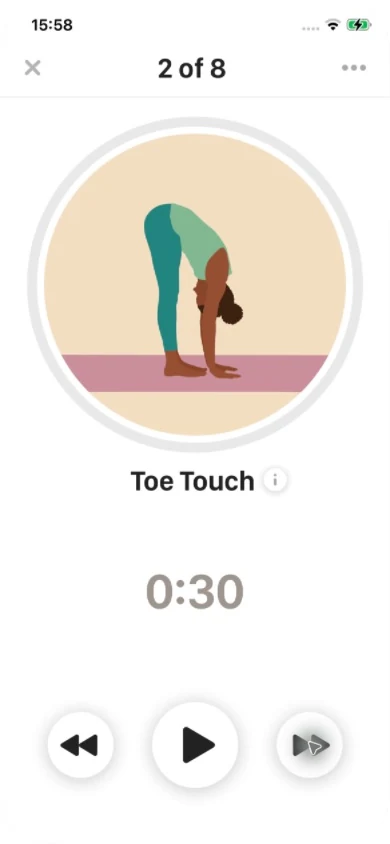
In Bend 7.8.0 (325) on an iPhone 12, we dismissed a subscription offer and skipped optional widget setup. The five-minute Wake Up preview listed movements and individual durations before Start. Its list included Upward Dog and Child’s Pose, so this particular routine needs floor space despite its short duration.
We started the timer, paused Upward Salute with 13 seconds remaining, then used Next. The next movement, Toe Touch, stayed paused at 30 seconds. That lets you advance before restarting the countdown. We did not complete the routine, test video guidance or check which other routines require a subscription. Access in this installed copy does not establish what every new user receives.
Unknot: read first, then check the timer behavior
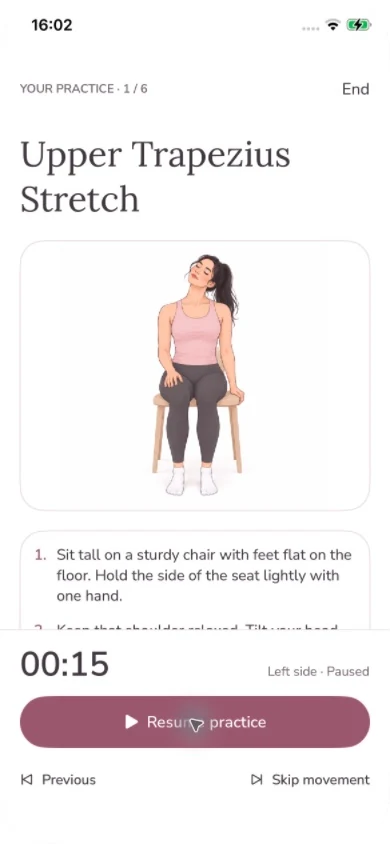
We used Unknot 2.0.1 (42) on the same iPhone with development access. This was not an App Store installation or a purchase test. We expanded the Upper Trapezius Stretch instructions in the Neck & Shoulders preview, started the session and paused it to read the numbered steps beside the illustration.
In this development build, Skip movement began the next side’s countdown even though we had paused the previous side. We paused again to read. Do not assume a pause carries across Skip; this behavior has not been verified in the current 2.0.2 store build. The public listing separately confirms illustrated guidance, numbered instructions, routine preview and pause controls. We did not test subscription purchase, reminder delivery or progress accuracy.
Down Dog: more setup, with useful guidance controls
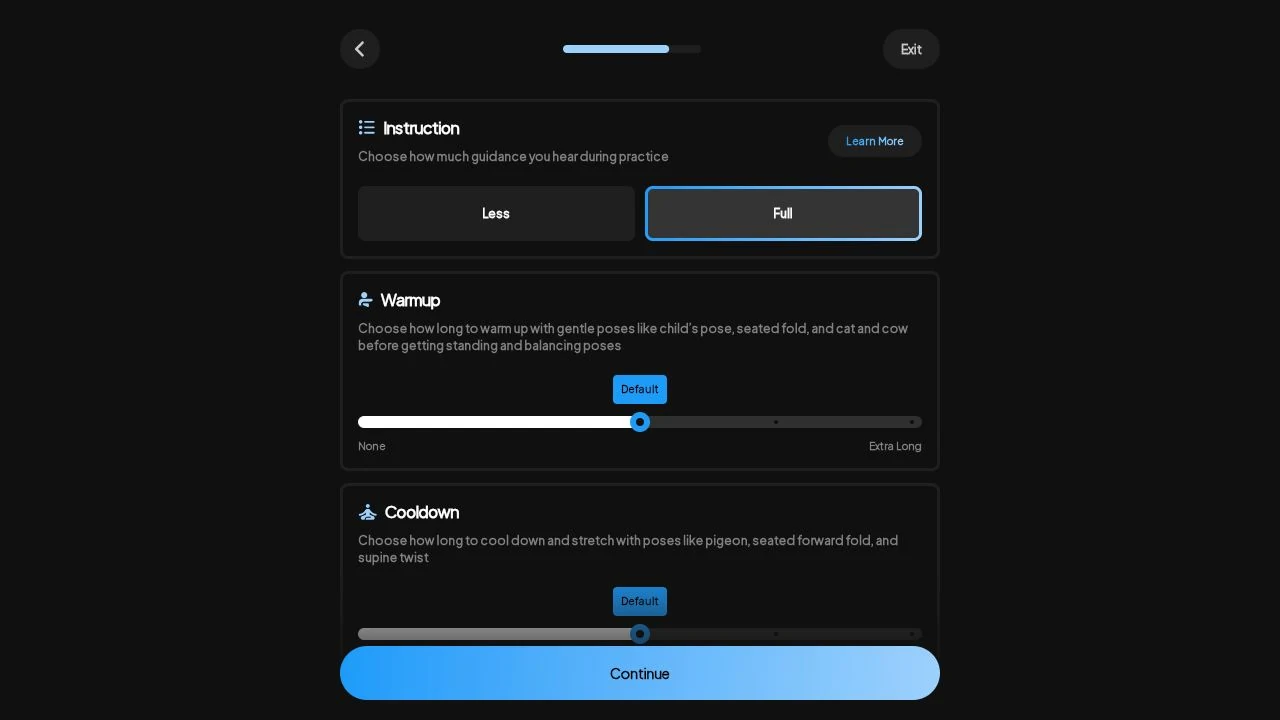
In Down Dog’s browser app, we selected Vinyasa, Beginner, a Neck boost, no music and Full instruction. The flow also exposed pose preferences and warmup, cooldown and hold-length controls. We skipped its optional challenge. The browser used the label Beginner; the linked FAQ calls its starting level Beginner 1.
The next screen required sign-up before practice. We stopped there: we did not create an account, generate a class, test spoken guidance or assess the iPhone player. These setup controls are useful if you want yoga you can configure, but they add decisions before a first session. The screenshot proves the settings were available, not how well the resulting class teaches a pose.
STRETCHIT and Wakeout: official sources only
We re-read both providers’ current feature pages on 18 October. We did not open their iPhone apps or run their sessions. Their entries below describe documented formats and starting points, not hands-on verdicts. We also did not test accessibility features, offline use or long-term results across this shortlist.
How long should you hold a stretch? · Plan your first stretching session
Our illustrated option for body-area routines
1. Unknot
Unknot’s iPhone listing describes body-area browsing, illustrated demonstrations, numbered steps and routine previews. Its format suits someone who wants to read the next movement before starting a timer. We make Unknot and keep it first in this editorial shortlist.
Choose a video-class app if you want to watch an instructor move through a whole session. Unknot offers paid premium access; check the options in the app. Our development-build timer test is documented above and does not verify the current store build.
Unknot’s current iPhone features
Download on the App StoreBest fit for browsing everyday routines
2. Bend
Bend’s published features include exercise illustrations and videos, premade routines, custom routines, reminders and streak tracking. The iPhone session we tested used an illustration and countdown controls.
In our iPhone test, Wake Up showed a movement list and durations before starting. Pause and Next let us inspect the next movement without restarting its timer. Check floor-space needs; a short routine is not necessarily a standing routine.
Best fit for structured flexibility programs
3. STRETCHIT
STRETCHIT provides structured flexibility training with clear starting levels. Its support documentation directs newcomers without flexibility experience to Difficulty 1 classes and Absolute Beginner programs.
Consider STRETCHIT if you want a named program to follow. Check the class length, required space and props before committing. We verified its beginner guidance in the official support page, but did not test class playback or progression.
Best fit for beginners learning yoga
4. Down Dog
Down Dog is the yoga option in this shortlist. Its FAQ recommends Beginner 1, fuller explanations and adjustable transitions. In the browser flow we tested, the starting level was labeled Beginner and Full instruction was available.
Choose it if you want to configure a yoga practice rather than pick a fixed stretching routine. We selected a Neck boost and inspected guidance controls, then reached sign-up. We did not generate a class or test the iPhone player.
Best fit for starting with tiny movements
5. Wakeout
Wakeout’s current website describes one-minute movement breaks, video demonstrations and movement games that use the phone camera. This makes it a different starting format from following a flexibility program.
Consider it when the main task is taking a brief break from sitting. If you want a course with a named beginner level, compare STRETCHIT or Down Dog. We checked Wakeout’s official descriptions, not its sessions, reminders or camera behavior.
A first-session check you can use
Before subscribing, inspect one suitable routine and its movement list. Check whether it needs a chair, a mat or more space than you have. Find the pause and skip controls before moving. If reading steps interrupts the timer, pause first. Choose between a repeatable sequence and a class you configure; neither format is the best fit for every beginner.
Questions before you start
Do I need existing flexibility before using a stretching app?
You can explore beginner-oriented guidance without an advanced flexibility goal. Check the actual movements against your abilities; a beginner label does not make every routine appropriate for everyone.
Should I choose illustrations or video for my first session?
Choose illustrations and written steps if you want to read before moving and follow a timer. Choose video if you prefer watching a demonstration or following a class. Preview the movements and available space before choosing either format.
How did you evaluate these beginner apps?
See the testing disclosure above. We tested selected controls in Bend, an internal Unknot build and Down Dog’s browser onboarding. We did not complete an equal five-app test or measure health outcomes. Current official feature pages were checked on 18 October 2026.
A stretch break. Made for you.
Unknot is available on the App Store for iPhone.